dsperber, thanks for the answer!
But LOL! What I was really searching for was is FC can treat RAR archives as it does ZIP ones.
It is clear for me now: it can't.
I was asking that because I started using Total Commander many years ago. Recently, I discovered FC and I like it. But I am missing proper handling of RAR archives (which I must use, for very good compression) and the test archive function (which is very useful for me, because I have a lot of archive transfers over questionable media, so I want to make sure the archive is OK).
RAR Plugin
Re: RAR Plugin
I am revisiting this 6 years later, because nothing was done to implement the packing of RAR archives in FC.
Please consider adding this functionality in an elegant way like other file managers did.
As an example, this is from the very interesting oMega File Manager:
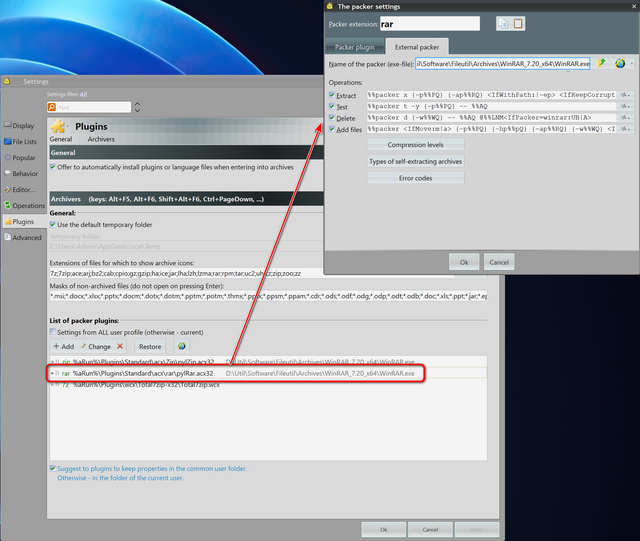
Together with oMega File Manager, Unreal Commander, Double Commander and Total Commander handle the creation of RAR archives very well.
Please consider adding this functionality in an elegant way like other file managers did.
As an example, this is from the very interesting oMega File Manager:
Together with oMega File Manager, Unreal Commander, Double Commander and Total Commander handle the creation of RAR archives very well.
Re: RAR Plugin
The creation of RAR archives outside RAR software is forbidden by the RAR license.
Other file managers like Total commander interface with an installed WinRAR or RAR
to create new RAR archives.
Other file managers like Total commander interface with an installed WinRAR or RAR
to create new RAR archives.
Windows 11 Home, Version 26H2 (OS Build 26300.9550)
Everything Version 1.5.0.1423b (x64), Everything Toolbar 3.5, Listary Pro 7.1.0.43 beta
FreeCommander XE 2026 Build 954 64-bit donor
Everything Version 1.5.0.1423b (x64), Everything Toolbar 3.5, Listary Pro 7.1.0.43 beta
FreeCommander XE 2026 Build 954 64-bit donor
Re: RAR Plugin
It is easily understandable that licenses have to be respected.
But what about developing the interfacing with an existing RAR? In my screenshot this is exactly what is being presented. And if other file managers do it for years or decades already, why doesn't FC?
But what about developing the interfacing with an existing RAR? In my screenshot this is exactly what is being presented. And if other file managers do it for years or decades already, why doesn't FC?
Re: RAR Plugin
Currently, FC misses a function to use an existing WinRAR installation
like Total Commander does it.
This has the benefit that a user can simply select rar format while creating an archive.
All FC needs is the path to an installed WinRAR in its config
and the format selection.
like Total Commander does it.
This has the benefit that a user can simply select rar format while creating an archive.
All FC needs is the path to an installed WinRAR in its config
and the format selection.
Windows 11 Home, Version 26H2 (OS Build 26300.9550)
Everything Version 1.5.0.1423b (x64), Everything Toolbar 3.5, Listary Pro 7.1.0.43 beta
FreeCommander XE 2026 Build 954 64-bit donor
Everything Version 1.5.0.1423b (x64), Everything Toolbar 3.5, Listary Pro 7.1.0.43 beta
FreeCommander XE 2026 Build 954 64-bit donor
Re: RAR Plugin
This is exactly what I was trying to say from the beginning that I am missing in FC!
1. I want FC to ask me the path to an installed WinRAR in its config;
2. In the Pack files window I want to be able to select WinRAR in Archive format combobox;
This is not at all a problem of license.
It is something missing for the longest time in FC.
It is something easy to implement.
And something that users would benefit from if implemented, provided that RAR format is pretty common in Windows world.
1. I want FC to ask me the path to an installed WinRAR in its config;
2. In the Pack files window I want to be able to select WinRAR in Archive format combobox;
This is not at all a problem of license.
It is something missing for the longest time in FC.
It is something easy to implement.
And something that users would benefit from if implemented, provided that RAR format is pretty common in Windows world.
Re: RAR Plugin
Well, even six years later I still have to say that I still don't follow why the behavior of FCXE's "interface" to WinRAR as I experience it on my own machines isn't the same as occurs in your own experience and therefore acceptable, assuming it is the same behavior.
Now if FCXE->WinRAR behavior on your system is different or non-functional or something, please elaborate with pictures. A picture's worth 1000 words.
So, here is a fresh sequence of what happens on my own Win11 v25H2 systems, running the latest FCXE 64-bit non-public v952.
I am also running licensed WinRAR x64 which I've had installed on my machines forever, upgrading to the latest version every so often when I think to check to see if there is one. In fact I just did check (since my current v7.13 has been on my systems for a while) and sure enough there's a more recent v7.23 available. So I just downloaded it, and will run through my install of WinRAR (posting pictures), which I will then invoke from FCXE v952 (again posting pictures) to again demonstrate how all of this operates on my own system. I will show how I can invoke WinRAR from FCXE, for both ZIP and RAR, both to create or expand both types of compressed files.
Please post your comment(s), if necessary, in response to what I will post next, to clarify what you would like to instead see occur differently than how things work for me.
NOTE: I have previously posted my own recent thread commenting on what I felt to be "problematic" current FCXE->WinRAR behavior under Win11 25H2. That thread is no longer on the forum, having been deleted by Marek. But 25H2 saw a very significant "lockdown" to File Explorer from Microsoft in terms of what was now allowed (and if so what could actually be done) by 3rd-party Explorer-related software products to items on both the taskbar and also system tray notification area.
Furthermore, the right-click context menu produced by File Explorer in Win11 itself is significantly changed from how things looked and worked in Win10 and all previous versions of Windows where was simply one single popup context menu presented when you right-clicked on something. With Win11 there is now first shown an ABBREVIATED menu which also offers "show more options" at the bottom. If you click on that "show more options" item on the abbreviated menu you now are presented with the "complete original old-fashioned context menu".
Now there are many other 3rd-party products that themselves optionally inject items into the right-click context menu (e.g. WinRAR, MediaInfo, PowerISO, Foxit PDF, CoPilot, etc.). In Win10 and before they all appeared on the one-and-only context menu which appeared in response to a right-click. In Win11 they may now appear either on the first popup men (which even then may only be after a brief "'populating animation" delay), and/or on the second "show more options" menu. Very complex and bothersome and a nuisance, both to users and software vendors alike I am sure. A real battle, and inconsistent across vendors.
I note that even this complicated 2-stage popup menu has been evolving in Win11, where the early original version of the first ABBREVIATED context menu didn't even contain PROPERTIES!!! The PROPERTIES item was only shown on that second complete "'show more options" complete menu. So for the incredibly common reason people right-click on something which is to look into "Properties" users were now obligated TO CLICK TWICE (first right-click, then left-click on "show more options", just to then finally get that offering of "Properties" on the second old fashioned and finally complete menu presentation, which again needed "Properties" to be left-clicked to finally get Properties shown!! What a pain! Thankfully Microsoft responded to what must have been millions of user complaints, and thankfully restored "Properties" inserted back into that first ABBREVIATED right-click presentation. And it also is still available in the second "complete" menu as well. Brilliant!
So all of this has naturally also affected how FCXE behaves under Win11 vs. Win10 specifically as regards that right-click menu presented by FCXE. Since the underlying Windows right-click behavior is now 2-stage with an abbreivated menu presented first, whereas the FCXE right-click behavior is still only 1-stage, there apparently must be compromises and changes made. Things previously "matching" on FCXE's right-click menu and Windows right-click menu now may now no longer map, or perhaps may be "delayed" (e.g. the "populating animation" in File Explorer's 1st popup menu). I'm sure this has been a real headache for Marek. NIghtmare.
Nevertheless as a result of Win11's new and evolving right-click context menu changes along with the 25H2 File Explorer "lockdown" of taskbar and notification area behavior, what FCXE shows on its own 1-stage right-click context menu has new "rules" as far as WinRAR appearing or not:
(a) If you run FCXE as (Admin) there is NO INSERTION of WinRAR in the FCXE right-click menu, although there still IS insertion of some other 3rd-party products. Obviously these other vendors have a somewhat different technique for their own "shell extensions" which accounts for these differences in the FCXE right-click menu.
(b) So you must run FCXE as (User) in order to be able to see WinRAR on the FCXE right-click context menu. But even then, the first time you invoke right-click on an item in an FCXE session you will NOT see WinRAR presented. I attribute this to the built-in "delay" (i.e. "populating animation" going on in File Explorer, where the WinRAR item only appears after a brief delay). My speculation is that this is still going on inside of FCXE's right-click processing behind the scenes, but was not completed fast enough or in time to actually make it into that initial popup menu from right-click in FCXE. Perhaps this is also a function of how fast your CPU is.
(c) For sure, with FCXE running as (User) now that you have done at least one right-click on something whatever and however FCXE gathers everything to be presented on its right-click menu presentation, well now WinRAR has managed to store itself in the list of what should be presented. So now for SECOND AND SUBSEQUENT right-clicks, now WinRAR IS PRESENTED!!! My own feeling is that this is better than nothing, but obviously not the way it should really be operating. And the root cause is the new 2-stage right-click context menu behavior of Win11 itself whereas FCXE still only has a single right-click context menu.
Ok. Enough background and history.
I will now post pictures of my new install for WinRAR 7.23 and invocation of WinRAR from FCXE for both ZIP and RAR, for both (a) create, and (b) unpack.
Now if FCXE->WinRAR behavior on your system is different or non-functional or something, please elaborate with pictures. A picture's worth 1000 words.
So, here is a fresh sequence of what happens on my own Win11 v25H2 systems, running the latest FCXE 64-bit non-public v952.
I am also running licensed WinRAR x64 which I've had installed on my machines forever, upgrading to the latest version every so often when I think to check to see if there is one. In fact I just did check (since my current v7.13 has been on my systems for a while) and sure enough there's a more recent v7.23 available. So I just downloaded it, and will run through my install of WinRAR (posting pictures), which I will then invoke from FCXE v952 (again posting pictures) to again demonstrate how all of this operates on my own system. I will show how I can invoke WinRAR from FCXE, for both ZIP and RAR, both to create or expand both types of compressed files.
Please post your comment(s), if necessary, in response to what I will post next, to clarify what you would like to instead see occur differently than how things work for me.
NOTE: I have previously posted my own recent thread commenting on what I felt to be "problematic" current FCXE->WinRAR behavior under Win11 25H2. That thread is no longer on the forum, having been deleted by Marek. But 25H2 saw a very significant "lockdown" to File Explorer from Microsoft in terms of what was now allowed (and if so what could actually be done) by 3rd-party Explorer-related software products to items on both the taskbar and also system tray notification area.
Furthermore, the right-click context menu produced by File Explorer in Win11 itself is significantly changed from how things looked and worked in Win10 and all previous versions of Windows where was simply one single popup context menu presented when you right-clicked on something. With Win11 there is now first shown an ABBREVIATED menu which also offers "show more options" at the bottom. If you click on that "show more options" item on the abbreviated menu you now are presented with the "complete original old-fashioned context menu".
Now there are many other 3rd-party products that themselves optionally inject items into the right-click context menu (e.g. WinRAR, MediaInfo, PowerISO, Foxit PDF, CoPilot, etc.). In Win10 and before they all appeared on the one-and-only context menu which appeared in response to a right-click. In Win11 they may now appear either on the first popup men (which even then may only be after a brief "'populating animation" delay), and/or on the second "show more options" menu. Very complex and bothersome and a nuisance, both to users and software vendors alike I am sure. A real battle, and inconsistent across vendors.
I note that even this complicated 2-stage popup menu has been evolving in Win11, where the early original version of the first ABBREVIATED context menu didn't even contain PROPERTIES!!! The PROPERTIES item was only shown on that second complete "'show more options" complete menu. So for the incredibly common reason people right-click on something which is to look into "Properties" users were now obligated TO CLICK TWICE (first right-click, then left-click on "show more options", just to then finally get that offering of "Properties" on the second old fashioned and finally complete menu presentation, which again needed "Properties" to be left-clicked to finally get Properties shown!! What a pain! Thankfully Microsoft responded to what must have been millions of user complaints, and thankfully restored "Properties" inserted back into that first ABBREVIATED right-click presentation. And it also is still available in the second "complete" menu as well. Brilliant!
So all of this has naturally also affected how FCXE behaves under Win11 vs. Win10 specifically as regards that right-click menu presented by FCXE. Since the underlying Windows right-click behavior is now 2-stage with an abbreivated menu presented first, whereas the FCXE right-click behavior is still only 1-stage, there apparently must be compromises and changes made. Things previously "matching" on FCXE's right-click menu and Windows right-click menu now may now no longer map, or perhaps may be "delayed" (e.g. the "populating animation" in File Explorer's 1st popup menu). I'm sure this has been a real headache for Marek. NIghtmare.
Nevertheless as a result of Win11's new and evolving right-click context menu changes along with the 25H2 File Explorer "lockdown" of taskbar and notification area behavior, what FCXE shows on its own 1-stage right-click context menu has new "rules" as far as WinRAR appearing or not:
(a) If you run FCXE as (Admin) there is NO INSERTION of WinRAR in the FCXE right-click menu, although there still IS insertion of some other 3rd-party products. Obviously these other vendors have a somewhat different technique for their own "shell extensions" which accounts for these differences in the FCXE right-click menu.
(b) So you must run FCXE as (User) in order to be able to see WinRAR on the FCXE right-click context menu. But even then, the first time you invoke right-click on an item in an FCXE session you will NOT see WinRAR presented. I attribute this to the built-in "delay" (i.e. "populating animation" going on in File Explorer, where the WinRAR item only appears after a brief delay). My speculation is that this is still going on inside of FCXE's right-click processing behind the scenes, but was not completed fast enough or in time to actually make it into that initial popup menu from right-click in FCXE. Perhaps this is also a function of how fast your CPU is.
(c) For sure, with FCXE running as (User) now that you have done at least one right-click on something whatever and however FCXE gathers everything to be presented on its right-click menu presentation, well now WinRAR has managed to store itself in the list of what should be presented. So now for SECOND AND SUBSEQUENT right-clicks, now WinRAR IS PRESENTED!!! My own feeling is that this is better than nothing, but obviously not the way it should really be operating. And the root cause is the new 2-stage right-click context menu behavior of Win11 itself whereas FCXE still only has a single right-click context menu.
Ok. Enough background and history.
I will now post pictures of my new install for WinRAR 7.23 and invocation of WinRAR from FCXE for both ZIP and RAR, for both (a) create, and (b) unpack.


Re: RAR Plugin
Next, here is a very short MP4 video of what happens when Win11 25H2 File Explorer right-click is performed on a file, whose type would justify additional "shell extension" insertions from 3rd-party software. This includes WinRAR, PowerISO, MediaInfo, MP3Tag, etc., some of which may appear on both the first (abbreviated) and second (complete) context menus from File Explorer, and some of which may only appear on the second (complete) context menu.
What is important to see in the video is the TIME DELAY which occurs after the right-click and before the first (abbreviated) menu is completed. There is obviously time being taken by the "shell extensions" from the other 3rd-party products, which results in a "populating animation" until the final presentation is complete.
Here is the brief video of right-click context menu from File Explorer.
And, now here is a short MP4 video of what happens when FCXE v952 is used, with a right-click on the very same file. The video shows both the FIRST right-click and its resulting context menu, as well as the SECOND right-click which produces a larger more complete context menu. Subsequent third, fourth, etc. right-click in the same FCXE program session would now all show WinRAR.
Again, note that there is only one context menu presented, not the 2-stage pair of menus as from File Explorer. Of course FCXE is running as "user" (not "admin").
Also, see that the first right-click context menu presented by FCXE (i.e. on the very first right-click invocation in the current FCXE program session) does NOT show WinRAR, alhtough it does show inserted items for WinAMP, PowerISO, CyberLink and Malwarebytes. My guess is that whatever these products are doing in their own shell extension logic is "fast enough" to make it into the list of things observed by FCXE and thus presented on its then defined single right-click context menu.
But by the time the second right-click is performed in this same FCXE program session, with all of the other "delayed populating" shell extensions finally getting observed and accumulated by FCXE and finally completed, the second and subsequent right-click menus is larger than the first right-click menu. So in addition to the 3rd-party products shown in the first context menu it now also does finally show WinRAR as well the other 3rd-party products that have their own insertions on my system (i.e. MediaInfo, MP3Tag, and Clipchamp).
What is important to see in the video is the TIME DELAY which occurs after the right-click and before the first (abbreviated) menu is completed. There is obviously time being taken by the "shell extensions" from the other 3rd-party products, which results in a "populating animation" until the final presentation is complete.
Here is the brief video of right-click context menu from File Explorer.
And, now here is a short MP4 video of what happens when FCXE v952 is used, with a right-click on the very same file. The video shows both the FIRST right-click and its resulting context menu, as well as the SECOND right-click which produces a larger more complete context menu. Subsequent third, fourth, etc. right-click in the same FCXE program session would now all show WinRAR.
Again, note that there is only one context menu presented, not the 2-stage pair of menus as from File Explorer. Of course FCXE is running as "user" (not "admin").
Also, see that the first right-click context menu presented by FCXE (i.e. on the very first right-click invocation in the current FCXE program session) does NOT show WinRAR, alhtough it does show inserted items for WinAMP, PowerISO, CyberLink and Malwarebytes. My guess is that whatever these products are doing in their own shell extension logic is "fast enough" to make it into the list of things observed by FCXE and thus presented on its then defined single right-click context menu.
But by the time the second right-click is performed in this same FCXE program session, with all of the other "delayed populating" shell extensions finally getting observed and accumulated by FCXE and finally completed, the second and subsequent right-click menus is larger than the first right-click menu. So in addition to the 3rd-party products shown in the first context menu it now also does finally show WinRAR as well the other 3rd-party products that have their own insertions on my system (i.e. MediaInfo, MP3Tag, and Clipchamp).
Re: RAR Plugin
And finally, here is a short video of using FCXE to invoke WinRAR in assorted modes.
First I use WinRAR to CREATE both a new RAR file and a new ZIP file. The two files being placed into the compressed result are first both selected, then right-click on the pair resulting in a context menu that offers WinRAR (i.e. it is the second or later right-click in the current FCXE program session).
Then I choose my output type, and let it run. Note that FCXE DOES NOT AUTO-REFRESH after its initial invocation of WinRAR. So the resulting "details" shows 0 bytes in the created RAR or ZIP file. I must manually push the REFRESH button (or, do something else which would result in an auto-refresh) in order for the actual final size of the created RAR or ZIP file to appear in the "details" pane. This isn't really critical, but I just point it out.
What is most important is that WinRAR to create a new RAR or ZIP file seems to be invoked from FCXE exactly as I would expect and want. Is this not what you want or expect? Do you have a different thing you want to do, or what I accomplished by done differently? Please clarify.
Next, the video shows how I EXPAND both the RAR and ZIP files I just created.
Once again, starting from a right-click on the RAR and ZIP files I invoke WinRAR from the context menu. Seems to be exactly what I want and need. Do you want or need something different?
Hopefully this will help to clarify my original comments about how FCXE behavior under Win11, and now under Win11 25H2, is quite different from how it has always behaved previously under Win10 and earlier versions of Windows.
This is really a story caused by what Microsoft has done in Win11 by implementing a 2-stage right-click context menu, with the first one "abbreviated" and with "populating animation" that takes some time to complete.
Nevertheless, I have no real problem using WinRAR as I want and need, via right-click functionality in FCXE. There may be some oddities and minor annoyances, but full WinRAR functionality is available.
So what am I still missing in my reading of your comments?
First I use WinRAR to CREATE both a new RAR file and a new ZIP file. The two files being placed into the compressed result are first both selected, then right-click on the pair resulting in a context menu that offers WinRAR (i.e. it is the second or later right-click in the current FCXE program session).
Then I choose my output type, and let it run. Note that FCXE DOES NOT AUTO-REFRESH after its initial invocation of WinRAR. So the resulting "details" shows 0 bytes in the created RAR or ZIP file. I must manually push the REFRESH button (or, do something else which would result in an auto-refresh) in order for the actual final size of the created RAR or ZIP file to appear in the "details" pane. This isn't really critical, but I just point it out.
What is most important is that WinRAR to create a new RAR or ZIP file seems to be invoked from FCXE exactly as I would expect and want. Is this not what you want or expect? Do you have a different thing you want to do, or what I accomplished by done differently? Please clarify.
Next, the video shows how I EXPAND both the RAR and ZIP files I just created.
Once again, starting from a right-click on the RAR and ZIP files I invoke WinRAR from the context menu. Seems to be exactly what I want and need. Do you want or need something different?
Hopefully this will help to clarify my original comments about how FCXE behavior under Win11, and now under Win11 25H2, is quite different from how it has always behaved previously under Win10 and earlier versions of Windows.
This is really a story caused by what Microsoft has done in Win11 by implementing a 2-stage right-click context menu, with the first one "abbreviated" and with "populating animation" that takes some time to complete.
Nevertheless, I have no real problem using WinRAR as I want and need, via right-click functionality in FCXE. There may be some oddities and minor annoyances, but full WinRAR functionality is available.
So what am I still missing in my reading of your comments?
Re: RAR Plugin
@dsperber
Thanks for the detailed reply trying to help, but this is a problem only Marek can fix.
From what I saw in your video, you use FC as another Windows Explorer. I am not using it like that, I am using it as it was intended to use an orthodox file manager. And this makes a world of difference in our points of view on this problem. Your proposed solution is a solution for you, but not a solution for me.
I have WinRAR on my disk but I do not want to use WinRAR shell integration.
I want to be able to select some files, press Alt+F5, and in archive format select RAR. As it is now, RAR is not among the options. See below:

I am sure that I am not the only one using FC that would want RAR support for packing implemented.
The fact that it was not implemented even after all these years of heavy development and even if it is relatively easy to do proves that the author does not want it implemented.
Thanks for the detailed reply trying to help, but this is a problem only Marek can fix.
From what I saw in your video, you use FC as another Windows Explorer. I am not using it like that, I am using it as it was intended to use an orthodox file manager. And this makes a world of difference in our points of view on this problem. Your proposed solution is a solution for you, but not a solution for me.
I have WinRAR on my disk but I do not want to use WinRAR shell integration.
I want to be able to select some files, press Alt+F5, and in archive format select RAR. As it is now, RAR is not among the options. See below:
I am sure that I am not the only one using FC that would want RAR support for packing implemented.
The fact that it was not implemented even after all these years of heavy development and even if it is relatively easy to do proves that the author does not want it implemented.
Who is online
Users browsing this forum: No registered users and 15 guests