
To reproduce:
- use window mode
- add column "Date Deleted" for recycle bin
- in Automatic Views use Sort on "Date Deleted" for Recycle bin
- you should have multiple files in the recycle bin, 200+, deleted in different times
- delete any file
- switch to Recycle bin tab
- focus/select last deleted file
- [..] item should be visible
- last deleted file should be on top, first in the list (below the [..] item
- restore this file
= result - focus is not changed to the file below, but to file at the bottom of the list
Repeat these steps, if needed, sometime the right file is focused, especially when using Ctrl+R before restoring.
EDIT: Another issue:
To reproduce:
- use default settings
- use NC mode
- use window mode
- add column "Date Deleted" for recycle bin
- you should have multiple files in the recycle bin, 200+, deleted in different times
- delete any file
- switch to Recycle bin tab
- focus/select last deleted file
- [..] item should be visible
- click the column "Date Deleted", so that the last deleted file is on top
- last deleted file should be on top, first in the list (below the [..] item and focused/selected
- press Ctrl+R to refresh list, multiple times
= result - random file is focused/selected every time
FC 954, Windows 10.
954 - Minor - Recycle bin focus issue after deleting (Updated)
Re: 954 - Minor - Recycle bin focus issue after deleting (Updated)
I can confirm that after restoring the topmost file that the remaining topmost file is NOT focused after restoring.
I CANNOT confirm that then the last file in the list is focused. After restoring, an arbitrary file in the list is then focused. When I consecutively restore the topmost file, the first .txt file in the list is always focused thereafter.
Also, when consecutively pressing "Ctrl+R", every now and then the icons are mixed up, i.e. the text file is showing an IrfanView icon instead of the normal text file icon.
And I can also report that when I switch to Recycle bin, the files are sorted according to type and the column "Date Deleted" is not visible. Here the icons are also mixed up. In order for the columns and icons to display correctly, I have to press "Ctrl+R".

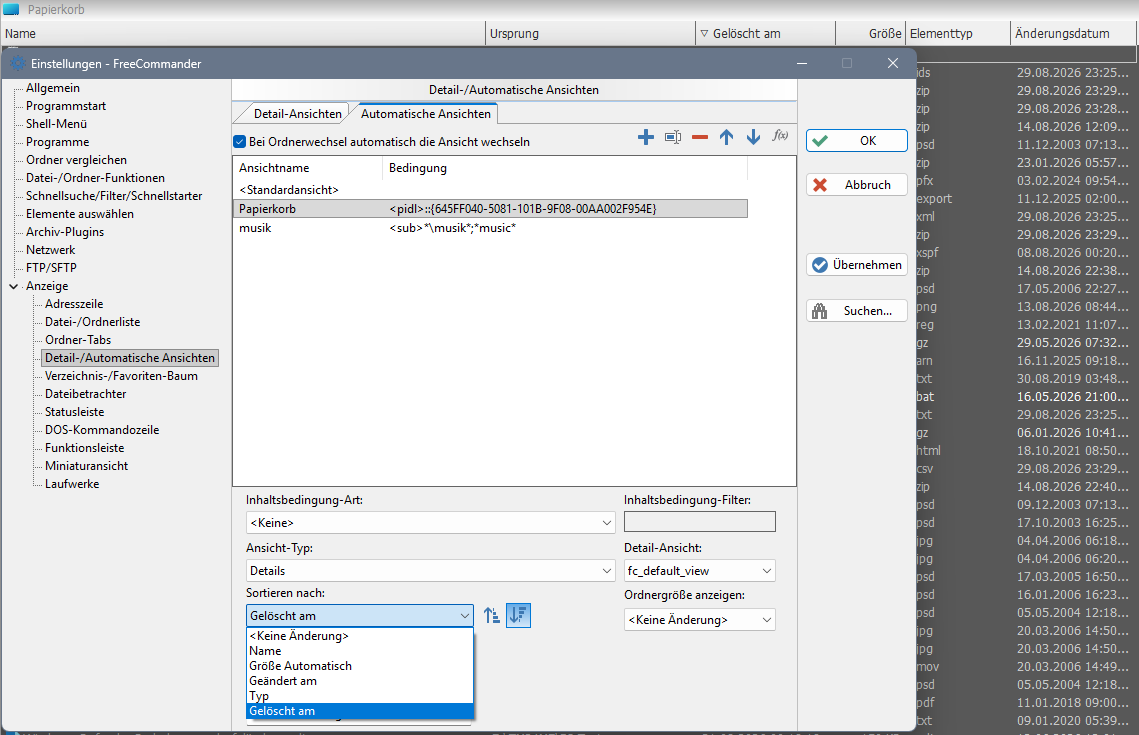
FreeCommander XE 2026 Build 954 64-bit non public TEST!
Windows 11 Pro 64-bit Version 25H2 Build 26200.9278
I CANNOT confirm that then the last file in the list is focused. After restoring, an arbitrary file in the list is then focused. When I consecutively restore the topmost file, the first .txt file in the list is always focused thereafter.
Also, when consecutively pressing "Ctrl+R", every now and then the icons are mixed up, i.e. the text file is showing an IrfanView icon instead of the normal text file icon.
And I can also report that when I switch to Recycle bin, the files are sorted according to type and the column "Date Deleted" is not visible. Here the icons are also mixed up. In order for the columns and icons to display correctly, I have to press "Ctrl+R".
FreeCommander XE 2026 Build 954 64-bit non public TEST!
Windows 11 Pro 64-bit Version 25H2 Build 26200.9278
Re: 954 - Minor - Recycle bin focus issue after deleting (Updated)
Thanks for testing, now after Ctrl+R it's quite random file here too - or exception (reported in the other post).
Your screenshot is in German, but I'm not sure if you're using the column "Date Deleted" in Column profiles? I'm using specific columns for the Recycle bin and this column profile also in the Automatic views - Column profile - Recycle bin (column profile name). Perhaps this is needed, since that column is just in the Recycle bin.
Which options are you using for Automatic views? Here it works good, after switching to Recycle bin, but here the column "Date Deleted" is the second column, right next to the Name column.Odamn-Ete wrote: 31.08.2026, 03:50And I can also report that when I switch to Recycle bin, the files are sorted according to type and the column "Date Deleted" is not visible. Here the icons are also mixed up. In order for the columns and icons to display correctly, I have to press "Ctrl+R".FreeCommander XE 2026 Build 954 64-bit non public TEST!
Windows 11 Pro 64-bit Version 25H2 Build 26200.9278
Your screenshot is in German, but I'm not sure if you're using the column "Date Deleted" in Column profiles? I'm using specific columns for the Recycle bin and this column profile also in the Automatic views - Column profile - Recycle bin (column profile name). Perhaps this is needed, since that column is just in the Recycle bin.
Re: 954 - Minor - Recycle bin focus issue after deleting (Updated)
Dreamer,
I'm willing to help where I can.
Yes, the column "Date Deleted" is being used for automatic views and is the denominator for sorting, latest first, as in your instructions on how to reproduce.
I do not have a column profile specified for the recycle bin. Sometime ago, I was having difficulties with viewing my recycle bin, and I deleted the column profile for the recycle bin,
and opted in to using the "fc_default_view" and the problem was solved. (viewtopic.php?t=14253)
I just added a column profile for the recycle bin and tested if it made a difference. (I closed FC -TEST! and started it anew before testing.)
It made no difference. When I go to recycle bin, "Date Deleted" is not shown and files are sorted according to "Element Type", just as in the screenshot I posted previously.
In version 953, everything works fine.
FreeCommander XE 2026 Build 9542 64-bit non public TEST!
Windows 11 Pro 64-bit Version 25H2 Build 26200.9278
I'm willing to help where I can.
Yes, the column "Date Deleted" is being used for automatic views and is the denominator for sorting, latest first, as in your instructions on how to reproduce.
I do not have a column profile specified for the recycle bin. Sometime ago, I was having difficulties with viewing my recycle bin, and I deleted the column profile for the recycle bin,
and opted in to using the "fc_default_view" and the problem was solved. (viewtopic.php?t=14253)
I just added a column profile for the recycle bin and tested if it made a difference. (I closed FC -TEST! and started it anew before testing.)
It made no difference. When I go to recycle bin, "Date Deleted" is not shown and files are sorted according to "Element Type", just as in the screenshot I posted previously.
In version 953, everything works fine.
FreeCommander XE 2026 Build 9542 64-bit non public TEST!
Windows 11 Pro 64-bit Version 25H2 Build 26200.9278
Re: 954 - Minor - Recycle bin focus issue after deleting (Updated)
I got it fixed.
I copied the fc.ini and the fc.views.ini from version 953 into the settings folder of the test version. Then I created a specific column profile for the recycle bin.
For some reason, FC was using the columns from the standard view even though a different column profile was set to be used in the specified tab.
I copied the fc.ini and the fc.views.ini from version 953 into the settings folder of the test version. Then I created a specific column profile for the recycle bin.
For some reason, FC was using the columns from the standard view even though a different column profile was set to be used in the specified tab.
Who is online
Users browsing this forum: No registered users and 2 guests