Conditional formatting with new styles
Posted: 05.04.2023, 12:54
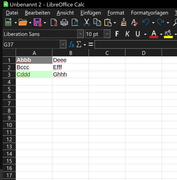
When using the default styles, everything works as it should /Fig. 01).
When defining and using (for me exclusively) own (new) style sheets to change the background color, based on standard, the style sheet of the last defined condition is always used for all applicable conditions. That means, the format in the last defined condition overrides all templates of the previous conditions.
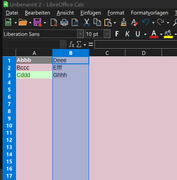
In addition, after confirming the "Edit Template" dialog with OK, ALL cells of the worksheet will use the just defined background color, excluding those that in my example (column A) were previously changed by the Conditional Formatting with Standard Templates (Figure 02a + 02b).

Kind regards
Manfred
When defining and using (for me exclusively) own (new) style sheets to change the background color, based on standard, the style sheet of the last defined condition is always used for all applicable conditions. That means, the format in the last defined condition overrides all templates of the previous conditions.
In addition, after confirming the "Edit Template" dialog with OK, ALL cells of the worksheet will use the just defined background color, excluding those that in my example (column A) were previously changed by the Conditional Formatting with Standard Templates (Figure 02a + 02b).
Kind regards
Manfred
