Page 1 of 1
FC-953 .odt & .ods files displayed mirror-inverted and upside down in Quick View
Posted: 21.09.2026, 11:19
by Odamn-Ete
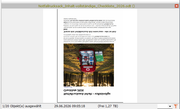
To reproduce
· select an appropriate file
· press ctrl+Q
=> the file is displayed mirror-inverted and upside down.
I also tested this using default settings and I also tested it with "FreeCommander XE 2026 Build 9542 64-bit non public TEST!" with same results.
FreeCommander XE 2026 Build 953 64-bit non public
Windows 11 Pro 64-bit Version 25H2 Build 26200.9457
Re: FC-953 .odt & .ods files displayed mirror-inverted and upside down in Quick View
Posted: 21.09.2026, 13:39
by Marek
Re: FC-953 .odt & .ods files displayed mirror-inverted and upside down in Quick View
Posted: 22.09.2026, 04:54
by Odamn-Ete
Thanks Marek for looking into this.
I downloaded your test file. Here is the result when I view it in Quick View:
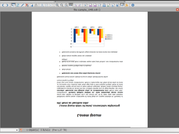
As you can see, I am still experiencing the issue.
In Windows Explorer, the preview is normal as well as when I set the view to symbols instead of details.
I create my files using the latest LibreOffice version.
Best regards
Re: FC-953 .odt & .ods files displayed mirror-inverted and upside down in Quick View
Posted: 22.09.2026, 23:10
by Dreamer
I can reproduce the issue, with default and custom settings, 954 64-bit, Windows 10.