639 - Network Tree Display
Posted: 09.11.2013, 23:48
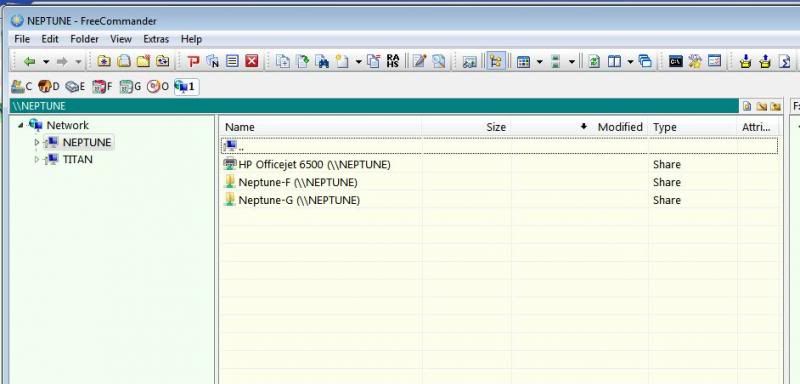
In FreeCommander 2009.02b, the network drive icon caused the tree display to start with "Network" as shown here:
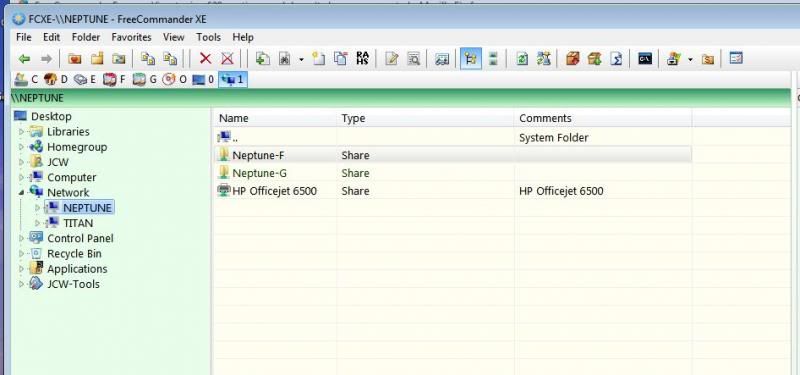
In FCXE the network drive icon displays the same tree as the "Desktop" icon, except "Network" is highlighted as shown here:
What is the point of having 2 drive icons (0 and 1) to just position the cursor?
I would expect the network drive icon to behave like other drives when the Base folder is set to Drive.
I would expect the network base folder to show "Network" and display the set of discovered hosts, like it was in FC 2009.02b
FCXE Option: Show Network as a Drive - enabled
FCXE Option: View/Tree/Management, Base folder is set to Drive
Windows 7 64-bit SP1 FreeCommanderXE 639
In FCXE the network drive icon displays the same tree as the "Desktop" icon, except "Network" is highlighted as shown here:
What is the point of having 2 drive icons (0 and 1) to just position the cursor?
I would expect the network drive icon to behave like other drives when the Base folder is set to Drive.
I would expect the network base folder to show "Network" and display the set of discovered hosts, like it was in FC 2009.02b
FCXE Option: Show Network as a Drive - enabled
FCXE Option: View/Tree/Management, Base folder is set to Drive
Windows 7 64-bit SP1 FreeCommanderXE 639