Page 1 of 1
Dragging folders to drive bar
Posted: 13.04.2016, 04:44
by asbaker47
I am using beta 32 bit in windows 8.1 (and 7) ) and I have the setting where there is a toolbar on top with all my sub-folders individually listed (show drive?). I drag and drop files and folders from the main tree to that bar. But when I look at the network sub-folder (on another computer in the house), sometimes there is the folder but it is empty. Other times it has brought over the files too.
I also had the problem on a Windows 10 computer using the public version of FC so I cannot assume it is a beta problem.
I don't always check the destination computer and that has been costly when traveling from one state to another.
Any idea what I am doing wrong? It's intermittent. Thanks.
Re: Dragging folders to drive bar problem
Posted: 14.04.2016, 04:30
by asbaker47
Additional info I just noticed-
1) Though the folders come over to the other drive empty, the files that were in the source folders come over outside the folders. So the destination folder has 2 empty sub-folders and multiple files not in the sub-folders.
2) This happens when I drag 2 or more folders to the network icons on the drive bar, but not when I drag only 1 folder. And not when I use my shortcut to "copy:copy with dialog" instead of drag and drop.
3) I even created a "connect to network drive" to a folder on the same computer so I was dragging folders on my laptop to my same laptop by dragging to a letter on the drive bar. Same result - files end up outside the folders they had been in if I drag 2 or more folders.
Could someone else see if dragging 2 folders to the show-drive bar has the same effect? Thanks.
Re: Dragging folders to drive bar
Posted: 14.04.2016, 12:35
by ralfso
Yes, your conclusions are right.
It happens on my computer als well.
Re: Dragging folders to drive bar
Posted: 14.04.2016, 20:55
by asbaker47
Thanks Ralf for checking and agreeing. At least it is not something foolish I have done. I will have to compensate by not using drag and drop for multiple folders. Have a great weekend.
Re: Dragging folders to drive bar
Posted: 14.04.2016, 22:22
by Marek
2) This happens when I drag 2 or more folders to the network icons on the drive bar,
I am trying this and I get the message "The operation is not supported".
You mean really drive bar?
Maybe some screenshots can help.
Re: Dragging folders to drive bar
Posted: 15.04.2016, 02:31
by asbaker47
Marek wrote:2) This happens when I drag 2 or more folders to the network icons on the drive bar,
I am trying this and I get the message "The operation is not supported".
You mean really drive bar?
Maybe some screenshots can help.
------------------------------------------------
In Build 719 32-bit donor - I tried to attach captures of settings choices and of the show drives as buttons on my screen by inserting the path of the image on my computer as in next line. hat did not show up as a graphic.
[img]C:\disks\FC-setting%20drives.jpg[/img]
[img]C:\disks\FC-%20show%20drives%20as%20buttons.jpg[/img]
EDIT - I guess putting the path between /img is not the way to post an attachment. Do I need permission?
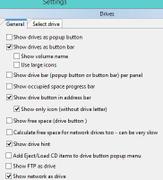
Meanwhile, under settings for drives I have "show drives as button bar" and "show drive button in address bar"
Re: Dragging folders to drive bar
Posted: 19.04.2016, 05:58
by asbaker47
These show the screen captures showing (2nd one?) my drive bar (many networked folders are assigned drive letters to which I drag things) and (1st one?) the settings menu where I activated the show-drive bar:
and


