[SOLVED] 801 - Office files - Error when Copying or double click
Posted: 08.09.2019, 03:01
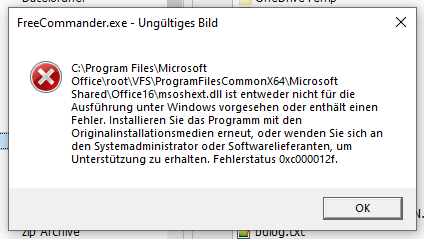
Tried copying an updated xlsx file over an existing one on an external drive (using button on main splitter)
an error message pops up (sie grafic)
Also tried copy and paste (right mouse click, context menu), same behavior
Pop-Up may appear more than once.
This also happens when I try to open any office file per double click on the file in FC file panel.
I do not receive error message when doing the same in Windows Explorer
I do not experience this behavior when running FC with default settings
FreeCommander XE 2019 Build 801 64-bit donor
Windows 10 Pro 64-bit Version 1903 Build 18362.329
Office Home and Business 2016
I do not experince this behavior with other file types, i.e. txt, zip, mp3, jpg etc.
an error message pops up (sie grafic)
Also tried copy and paste (right mouse click, context menu), same behavior
Pop-Up may appear more than once.
This also happens when I try to open any office file per double click on the file in FC file panel.
I do not receive error message when doing the same in Windows Explorer
I do not experience this behavior when running FC with default settings
FreeCommander XE 2019 Build 801 64-bit donor
Windows 10 Pro 64-bit Version 1903 Build 18362.329
Office Home and Business 2016
I do not experince this behavior with other file types, i.e. txt, zip, mp3, jpg etc.