Thanks, Marek.
Tried it.
Didn't work.
It created the new folder, but did not move the selected files into the new folder.
Search found 18 matches
- 20.06.2026, 03:35
- Forum: Feature Requests
- Topic: New folder with selection
- Replies: 5
- Views: 177333
- 12.06.2026, 05:04
- Forum: Feature Requests
- Topic: New folder with selection
- Replies: 5
- Views: 177333
New folder with selection
I thought FC had "New folder with selection" where you could select a bunch of files and ask for them to be collected into a new folder.
I was wrong - apparently I had gained this ability from Windows Power Tools long ago. I use it a LOT curating tons of files.
But it would be great if FC could ...
I was wrong - apparently I had gained this ability from Windows Power Tools long ago. I use it a LOT curating tons of files.
But it would be great if FC could ...
- 04.02.2026, 01:17
- Forum: Resolved Bugs, Issues, Requests
- Topic: FreeCommander XE 2026 Build 944 64-bit non public
- Replies: 2
- Views: 266340
FreeCommander XE 2026 Build 944 64-bit non public
I believe RENAME is broken in build 944.
After selecting a file and invoking RENAME, the textboxes are empty and unable to be edited...
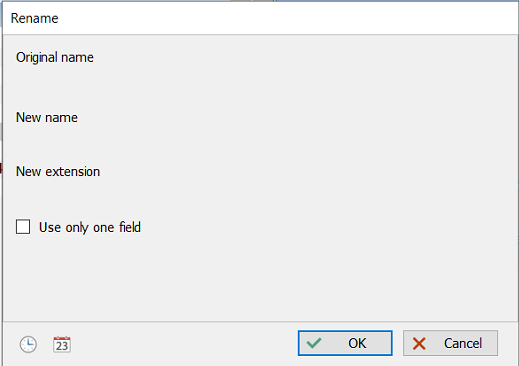
Or maybe it's just my 3 computers...
After selecting a file and invoking RENAME, the textboxes are empty and unable to be edited...
Or maybe it's just my 3 computers...
- 11.10.2025, 01:55
- Forum: Feature Requests
- Topic: New folder with selection - keyboard shortcut
- Replies: 6
- Views: 189765
Re: New folder with selection - keyboard shortcut
What version of FC are you using?Karol wrote: 04.10.2025, 19:15 Could you provide some screenshot with the item "New folder with selection" ?
I think, I do not have such item.
https://postimg.cc/Mc10ftjn
- 04.10.2025, 05:15
- Forum: Feature Requests
- Topic: New folder with selection - keyboard shortcut
- Replies: 6
- Views: 189765
Re: New folder with selection - keyboard shortcut
Hi Karol. You don't seem to know of the " New folder with selection " feature.
Select a few files, right-click them, and choose " New folder with selection " from the context menu.
You will then see a new folder called " New folder with items " containing the items you selected.
It's neat.
Sweet ...
Select a few files, right-click them, and choose " New folder with selection " from the context menu.
You will then see a new folder called " New folder with items " containing the items you selected.
It's neat.
Sweet ...
- 04.10.2025, 05:07
- Forum: Feature Requests
- Topic: Rename 'New Folder With Selection'
- Replies: 2
- Views: 149702
Re: Rename 'New Folder With Selection'
I mean exactly what I said.
When you select some files, right click, and choose " New folder with selection ",
the resulting folder is named " New folder with items "
My point is that I don't like the automatic name. I want the option to immediately rename it to something meaningful.
Try it. See ...
When you select some files, right click, and choose " New folder with selection ",
the resulting folder is named " New folder with items "
My point is that I don't like the automatic name. I want the option to immediately rename it to something meaningful.
Try it. See ...
- 16.09.2025, 03:15
- Forum: Feature Requests
- Topic: Rename 'New Folder With Selection'
- Replies: 2
- Views: 149702
Rename 'New Folder With Selection'
I am very fond of the 'New Folder With Selection' feature, and use it regularly.
The downside is that the folder is automatically named 'New Folder With Items', and I *always* need to rename it.
But first, I have to find it. With its name beginning with "N", the new folder often appears in the ...
The downside is that the folder is automatically named 'New Folder With Items', and I *always* need to rename it.
But first, I have to find it. With its name beginning with "N", the new folder often appears in the ...
- 11.06.2025, 03:55
- Forum: Feature Requests
- Topic: Multi rename - preserve last "Replace all occurrences" setting
- Replies: 2
- Views: 173987
Re: Multi rename - preserve last "Replace all occurrences" setting
Thanks. Good thinking.
I had not ever investigated the Multirename Options menu.
Free Commander is always full of new and interesting stuff.
I had not ever investigated the Multirename Options menu.
Free Commander is always full of new and interesting stuff.
- 04.06.2025, 03:30
- Forum: Feature Requests
- Topic: Multi rename bonus - Trim leading/trailing spaces
- Replies: 2
- Views: 167084
Multi rename bonus - Trim leading/trailing spaces
A handy little addition to multi rename's checkbox options would be "Trim spaces" to remove leading & trailing spaces.
Another bonus would be "Remove double spaces", because they're a pain - and does anyone ever really want a double space in a filename?
Another bonus would be "Remove double spaces", because they're a pain - and does anyone ever really want a double space in a filename?
- 04.06.2025, 03:24
- Forum: Feature Requests
- Topic: Multi rename - preserve last "Replace all occurrences" setting
- Replies: 2
- Views: 173987
Multi rename - preserve last "Replace all occurrences" setting
In multi-rename, the "Replace all occurrences" defaults to "OFF" every time multirename is invoked.
I usually want that box ticked/checked since that is what I need 99% of the time.
Please either make the default setting ON, or remember its last setting when multi rename is next used.
I usually want that box ticked/checked since that is what I need 99% of the time.
Please either make the default setting ON, or remember its last setting when multi rename is next used.
- 23.12.2024, 00:09
- Forum: Feature Requests
- Topic: Multi rename - protecting file extensions
- Replies: 4
- Views: 187315
Re: Multi rename - protecting file extensions
And, of course, today I discovered UNDO in the Command menu.
D'oh!

D'oh!
- 22.12.2024, 03:12
- Forum: Feature Requests
- Topic: Multi rename - protecting file extensions
- Replies: 4
- Views: 187315
Re: Multi rename - protecting file extensions
This is getting serious. I just renamed a few thousand media files to remove the dot (.) within filenames.
I forgot to exclude the filename extension.
I just had to spend an hour manually reinstalling dots before the many different extensions of a few thousand files.
Please make the filename's dot ...
I forgot to exclude the filename extension.
I just had to spend an hour manually reinstalling dots before the many different extensions of a few thousand files.
Please make the filename's dot ...
- 03.11.2024, 00:17
- Forum: Bug reports
- Topic: Action toolbar - "Details: Auto resize columns" has no icon
- Replies: 0
- Views: 199534
Action toolbar - "Details: Auto resize columns" has no icon
In my action toolbar, I have "Details: Auto resize columns".
But the icon in the toolbar is blank...

Can I have a nice (non-blank) icon please?

But the icon in the toolbar is blank...
Can I have a nice (non-blank) icon please?
- 01.11.2024, 01:01
- Forum: Feature Requests
- Topic: Multi rename - protecting file extensions
- Replies: 4
- Views: 187315
Multi rename - protecting file extensions
When using multi rename to do a Search/replace, a couple of times the dot before the file extension has been changed, rendering the file meaningless to the OS.
I know there is a tickbox (checkbox) for "Exclude extension", but it is deselected by default, which I believe is a dangerous and unwise ...
I know there is a tickbox (checkbox) for "Exclude extension", but it is deselected by default, which I believe is a dangerous and unwise ...
- 15.06.2024, 05:22
- Forum: Translation
- Topic: English.lng tweaks
- Replies: 2
- Views: 190246
English.lng tweaks
The English translations of FC strings are usually very accurate and clear, but some could be tweaked.
4602=The file name contains not visible characters typical for malicious software (virus).
Change "not visible" to "invisible"
6012=Destination device is full and happens to be removable
Change ...
4602=The file name contains not visible characters typical for malicious software (virus).
Change "not visible" to "invisible"
6012=Destination device is full and happens to be removable
Change ...