
1) There is no remaining time, is it planned to be added?
2) If I start copying another file, while one is already running, there are few possibilities for improvements:
a) add new file(s) to the list of files in the first dialog and copy all one by one
b) workaround - auto-pause new copy process if one is already running
3) Option to auto-minimize new copy/move processes.
4) Show copy/move progress in status bar, customizable, or at least the number of files, %, time, e.g:
Copying file 4/20 24% 2 minutes remaining
5) Option "show dialog when process is done".
What do you think, any suggestions are welcome.
Copy/move questions and suggestions

Re: Copy/move questions and suggestions
Yes, in the future.1) There is no remaining time, is it planned to be added?
I plan job queue for file operations.2) If I start copying another file, while one is already running, there are few possibilities for improvements:
You mean "Auto minimize, when starting the operation" on the settings tab (copy dialog)?3) Option to auto-minimize new copy/move processes.
You mean the status bar of the copy dialog?4) Show copy/move progress in status bar, customizable, or at least the number of files, %, time, e.g:
Re: Copy/move questions and suggestions
Hm.. I didn't see the Settings tab, I had to cancel the operation to see it. Don't know why, perhaps another option - I'm using F5/F6 without confirmation, but that tab should appear though, I think.3) You mean "Auto minimize, when starting the operation" on the settings tab (copy dialog)?
No, I mean the main FC window, it should work together with the previous option (auto-minimize), so I'd start copying/moving, operation would start minimized and somewhere the operation progress would shown, don't know if in the status bar, or perhaps another special operation bar would be better. Just to have the information about the progress.4) You mean the status bar of the copy dialog?
Here's the example:
Code: Select all
( |> ) Copying: file 4/20 24% 2 minutes remaining | ( || ) Moving file 1/2 0% (paused)Later it might be upgraded to something like "job queue" - so auto pause all other operations until the first one is completed, then auto start the second operation... Another possible option might be dragging the operations to change the order/priority.
Re: Copy/move questions and suggestions
I have a question to point 3:
are you planning to add a little different option:
"Auto minimize to tray, when starting the operation"?
It would be nice especially when you copy many files to different directories and don't want to have multiple copy windows on your task bar.
R.
are you planning to add a little different option:
"Auto minimize to tray, when starting the operation"?
It would be nice especially when you copy many files to different directories and don't want to have multiple copy windows on your task bar.
R.
Re: Copy/move questions and suggestions
3) It is already available, in copy/move dialog, switch to Settings tab (third) and enable option "Auto minimize when starting operation".
However, it's a bit buggy, only the first dialog is auto-minimized, others are not minimized automatically.
However, it's a bit buggy, only the first dialog is auto-minimized, others are not minimized automatically.
Re: Copy/move questions and suggestions
Thanks for the answer, but it's not what I was thinking about.
This option mentioned by you is minimizing the copy dialog to taskbar (the one with Start button)
and I was thinking of tray (icons next to date/clock, right side of taskbar).
This is tray:
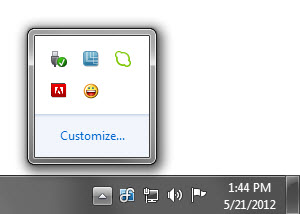 .
.
R.
This option mentioned by you is minimizing the copy dialog to taskbar (the one with Start button)
and I was thinking of tray (icons next to date/clock, right side of taskbar).
This is tray:
.R.
Re: Copy/move questions and suggestions
Hey,
I found a workaround for my problem.
I use external program called RBTray which is free/open source - http://rbtray.sourceforge.net/
It allows you to minimize any window into Tray just by clicking minimize button with right mouse button.
And thats it.
Although it would be nice if FC offered such an option.
R.
I found a workaround for my problem.
I use external program called RBTray which is free/open source - http://rbtray.sourceforge.net/
It allows you to minimize any window into Tray just by clicking minimize button with right mouse button.
And thats it.
Although it would be nice if FC offered such an option.
R.
Who is online
Users browsing this forum: Google [Bot] and 23 guests